
Skip to main content



How Can We Help?
Welcome to our Support Portal. Search for answers using the search box below,
or create a support ticket if you cannot find your answer.
Tip: Start typing in the input box for immediate search results.
Table of Contents
If you receive a questionable email, use the built-in reporting tools to notify SWIC IT and Microsoft.
When in doubt, don’t click any suspicious links, open attachments or enter personal information.
Desktop Outlook
Select the email, and report.
- If you’re on campus, and don’t see the reporting buttons, please contact Help Desk at x4357. You may need to have your Office version updated.
- If you receive a “Network Error” message, please close/reopen Outlook and try again.
Outlook Web
Select the email, and report:
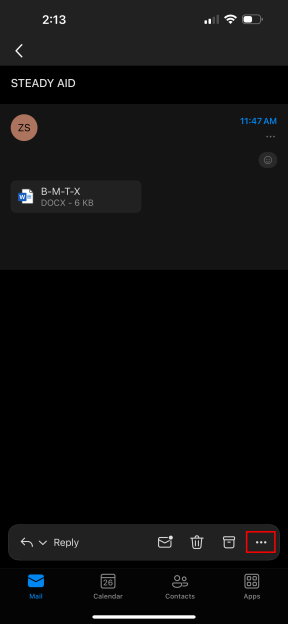
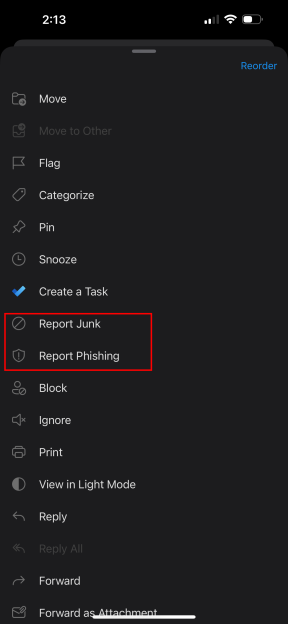
Outlook Mobile (iPhone)
Select the email, click the three dots, and report:
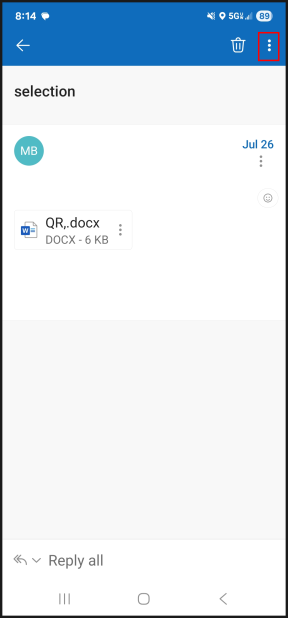
Outlook Mobile (Android)
Select the email, click the three dots, and report:
More Help
Contact Technology Assistance at 618-222-7942 or email tech.assistance@swic.edu.