

How Can We Help?
Welcome to our Support Portal. Search for answers using the search box below,
or create a support ticket if you cannot find your answer.
Tip: Start typing in the input box for immediate search results.
Table of Contents
Before you Drop Check this out!
Please review this Important Information Before Dropping a Course.
There are two ways to view your drop deadline dates in your eSTORM Student Center.
View drop deadline dates by class
- Go to eSTORM and sign in.
- Click on the Student Center tile:
- Go to the Academics section, and click on the calendar icon next to the class you wish to view the drop deadlines for:
- The drop deadlines are listed for that class:
- Please review other important information on the page.

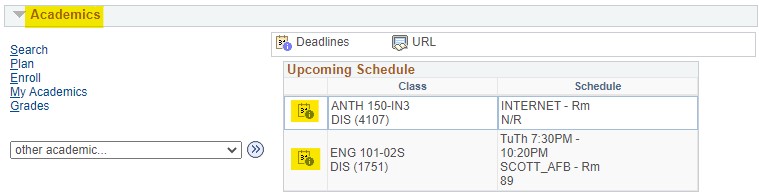
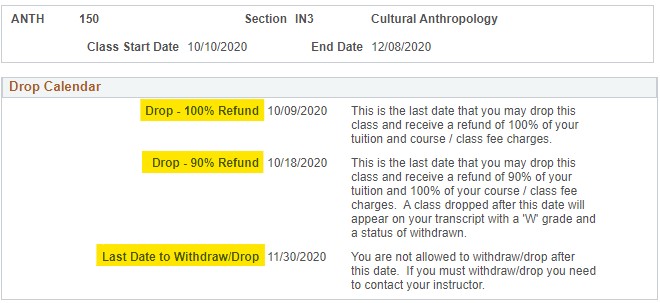
View all drop deadlines dates by term/semester
- Go to eSTORM and sign in.
- Click on the Student Center tile:
- Go to the Finances section, open the other financial… list box, select Drop Deadline Dates, and click the round button:
- Choose (click) the term:
- The drop deadline dates are listed for all classes in that term/semester:
- Please review other important information on the page.
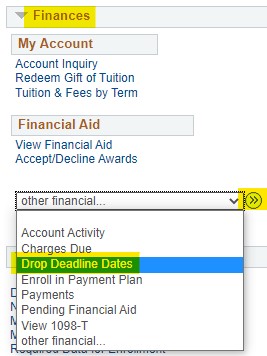
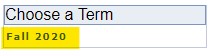

Where can I find more help?
Click HERE to contact the Technology Assistance Center.
Click HERE to contact Student Accounts (Business Office).
Click HERE to contact Financial Aid.