
How Can We Help?
Welcome to our Support Portal. Search for answers using the search box below,
or create a support ticket if you cannot find your answer.
Tip: Start typing in the input box for immediate search results.
Table of Contents
Voicemail to email feature
Many employees have a voicemail to email feature for their SWIC issued voicemail account.
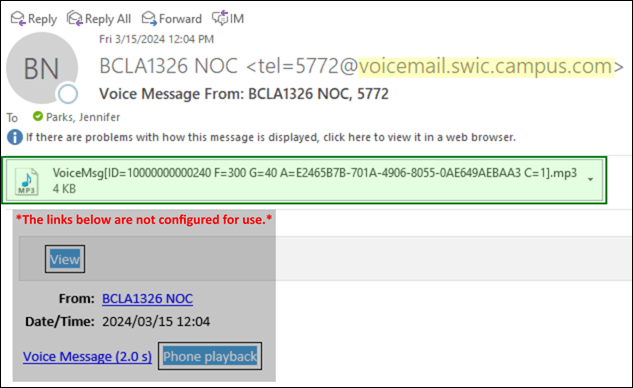
- To listen to your voicemail, double click the attachment.
- To delete your voicemail:
- Delete the email (the voicemail will still be available as long as the email remains in your deleted items folder), or
- Login to voicemail and follow the prompts to delete (the voicemail is deleted permanently).
- Once voicemails are deleted (deleted from your deleted items folder or via voicemail, they are NOT recoverable).
- Links in the body of the email are not configured to work.
More Help
If you have any questions, please feel free to reach out Tech.Assistance@swic.edu or by email or at 618-222-7942 (x7942). Visit other phone services knowledge base articles.